What should an HVAC company do about missed calls after hours?
Measure missed calls by source and time, then match coverage to the gap. Use live or AI answering for supported calls and approved text-back for eligible unanswered calls. Check delivery, assign a callback owner and track the result in your CRM. A text or appointment request is not a confirmed booking.
Call leak audit
Find out how many HVAC calls are turning into lost jobs.
We will map where your calls, missed-call texts, CRM stages, and after-hours coverage are leaking revenue so you can see the fastest fix before peak season.
HVAC missed calls need a clear response path and someone who owns it. Start with your phone logs: when did the call arrive, what did the caller need and did anyone follow up? Add coverage where calls slip through, then track confirmed bookings rather than counting texts as recovered jobs.
That call flow belongs in your HVAC marketing system, alongside lead sources and follow-up.
Where Do HVAC Calls Go Unanswered?
Check lunch breaks, busy dispatch periods, simultaneous calls and nights or weekends. A heat wave or cold snap can push call volume past what your office can handle. Separate peak season from quieter weeks when reviewing the pattern.
A caller who needs air conditioning repair may try another shop rather than leave a voicemail. Some businesses lose track of a callback when a customer calls twice. Keep the attempts together and assign one owner.
Measure the Gap Before Estimating Revenue
Review the last 30 days of calls. Separate spam, duplicate attempts and existing-customer updates from new service inquiries. Match missed inquiries to later callbacks and bookings before counting them as lost.
How much revenue do HVAC companies lose from missed calls? The cost of missed calls for contractors depends on how many callers still needed service, how many would have booked and the revenue collected from the work. Your own records can help you estimate the gap without treating every missed call as a lost job.
For example, suppose 20 unique service inquiries went unanswered and your team later booked 12 of them. That leaves eight unresolved inquiries to investigate, not eight confirmed lost jobs. For HVAC companies, revenue loss from missed calls may come from jobs that customers book elsewhere. Record that outcome when you can verify it and keep unknown outcomes separate.
The cost of missed calls for HVAC companies can include potential revenue from service requests that never become appointments. To estimate a possible range, multiply unresolved inquiries by your observed booking rate, the share of booked appointments that become paid jobs and your average collected revenue per paid job. For example, eight inquiries at a 50% booking rate, a 75% paid-job rate and $400 per paid job suggest $1,200 in potential revenue. Those figures are examples; actual outcomes and available capacity may differ.
Use the same method to compare business hours with nights and weekends. If most unresolved calls arrive during lunch, overflow coverage may solve a different problem than an after-hours answering service. Look at staffing and call volume together before choosing where to add coverage.
HVAC business owners can compare the number of service calls they can take with the inquiries arriving in each coverage window. If the schedule is full, give callers an honest next step and keep a callback list for openings.
Use your missed-call count, booking rate, available capacity and collected job value in the HVAC missed-call calculator. Replace its assumptions with your records and check whether your team had room to take the work.
How Should After-Hours HVAC Calls Work?
Set after-hours coverage around your service area, calendar and on-call roster. AI call answering should name your HVAC company, identify itself as an AI assistant and explain the next step it can support.
HVAC companies can use AI tools to route missed-call callbacks and prioritize service requests. An AI receptionist can also take customer calls when the office is closed and pass the details to your team. An answering service with a live person is another option. Compare each with real examples from your shop: an urgent repair, a routine maintenance request and a caller asking to speak to a person.
Ask whether an AI voice agent can transfer an inbound call, pass the details to your team and alert a backup if the transfer fails. Test those steps with the tools your shop uses.
Routine service: capture approved intake details and book only through a supported calendar connection. If no slot exists or booking fails, record a pending request for staff to confirm.
HVAC emergencies: use the shop-approved safety and urgent-call script before routine data capture. Reported burning smells or other safety concerns need that approved route. The assistant should not diagnose equipment or promise dispatch.
Price questions or upset callers: hand off to a named staff member. If a transfer fails, use the approved fallback and assign a callback task to the backup owner.
If you advertise 24/7 emergency HVAC services, check that the roster and fallback match that promise. Test full calendars and unanswered transfers before launch. The HVAC answering service guide compares coverage options.
Build a Missed-Call Recovery Workflow
HVAC missed call recovery can include text-back when the caller and channel qualify. Set the permission, timing and follow-up rules before switching it on.
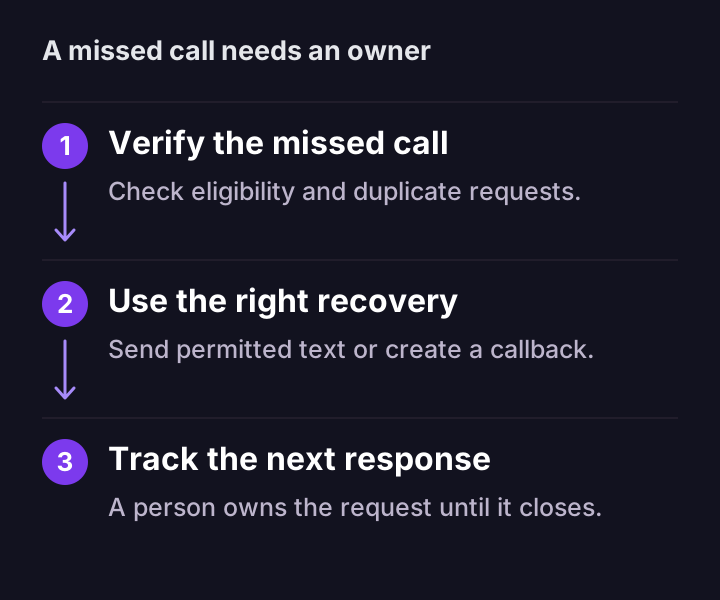
Check eligibility: verify contact permission, number type, opt-outs and duplicate activity. Use the approved sending window.
Send an approved message: for example, “Sorry we missed your call at [Company]. Is this for AC repair, heating, maintenance or a quote?” Include the required opt-out wording.
Check delivery: log the result. If SMS fails or the number cannot receive texts, create a callback task through a permitted channel.
Assign the response: send replies to a named owner. Stop generic reminders on a reply, booking, decline or opt-out; let staff handle the next step.
A missed call needs an eligible response path, a named owner and a recorded outcome.
Before relying on any tool, place a test call from a number your team controls. Check what the caller hears, when an eligible text arrives and who receives the reply. Repeat the test outside business hours and during a busy period. Correct any missed alerts before using the workflow with customers.
Track the Outcome in Your CRM
Connect the call and response to one CRM record. Keep the source, service type, urgency, owner, delivery result and next action visible. Track pending requests separately from confirmed appointments, then record estimate status, won or lost outcomes and collected revenue.
A weekly report can show which inquiries became confirmed jobs and which still need attention. Build it from booking and payment records. The HVAC CRM guide explains the pipeline.
Compare Calls With Jobs by Source
For Google Ads, local SEO and other channels, compare answered calls, missed inquiries, bookings, quotes, completed jobs and revenue by source. A high call count alone does not show how many qualified inquiries became jobs.
Choose the largest measured gap first, test its response and review unresolved callbacks with your team. Book a call-flow review to map the coverage, handoffs and tracking your shop needs.
FAQ
Common questions
How many calls do HVAC companies miss?
The number varies with call volume, staffing, season and after-hours coverage. Review your phone logs by source and time. Separate spam and repeat callers from service inquiries, then match those inquiries to callbacks and confirmed bookings. Your own records give a useful baseline.
What is the best way for an HVAC company to stop missing calls?
Match coverage to the gap: live or AI answering for supported calls, approved text-back for eligible unanswered calls and a CRM owner for follow-up. Check delivery and create a callback task when needed. Stop generic reminders when the caller replies, books, declines or opts out. A sent text does not confirm a booking.
Do missed calls hurt HVAC Google Ads performance?
Unanswered paid inquiries can raise the cost per booked job when callers do not reconnect. Compare answered and missed calls by campaign, then follow qualified inquiries through confirmed bookings, completed jobs and collected revenue. Total calls or cost per lead alone cannot show what the shop earned.